The budget app that doesn’t want your email.
Your salary, your rent, your spending habits stay on your device. Budget Lock keeps your financial life encrypted and local. AES-256 encryption. Zero servers. Zero accounts. Zero analytics on your money.
Everything You Need to Manage Your Money Offline
Track expenses, budgets, loans, savings goals & investments — all offline with AES-256 encryption. No subscriptions. Cloud backup optional. A free expense manager and money tracking app for Android.
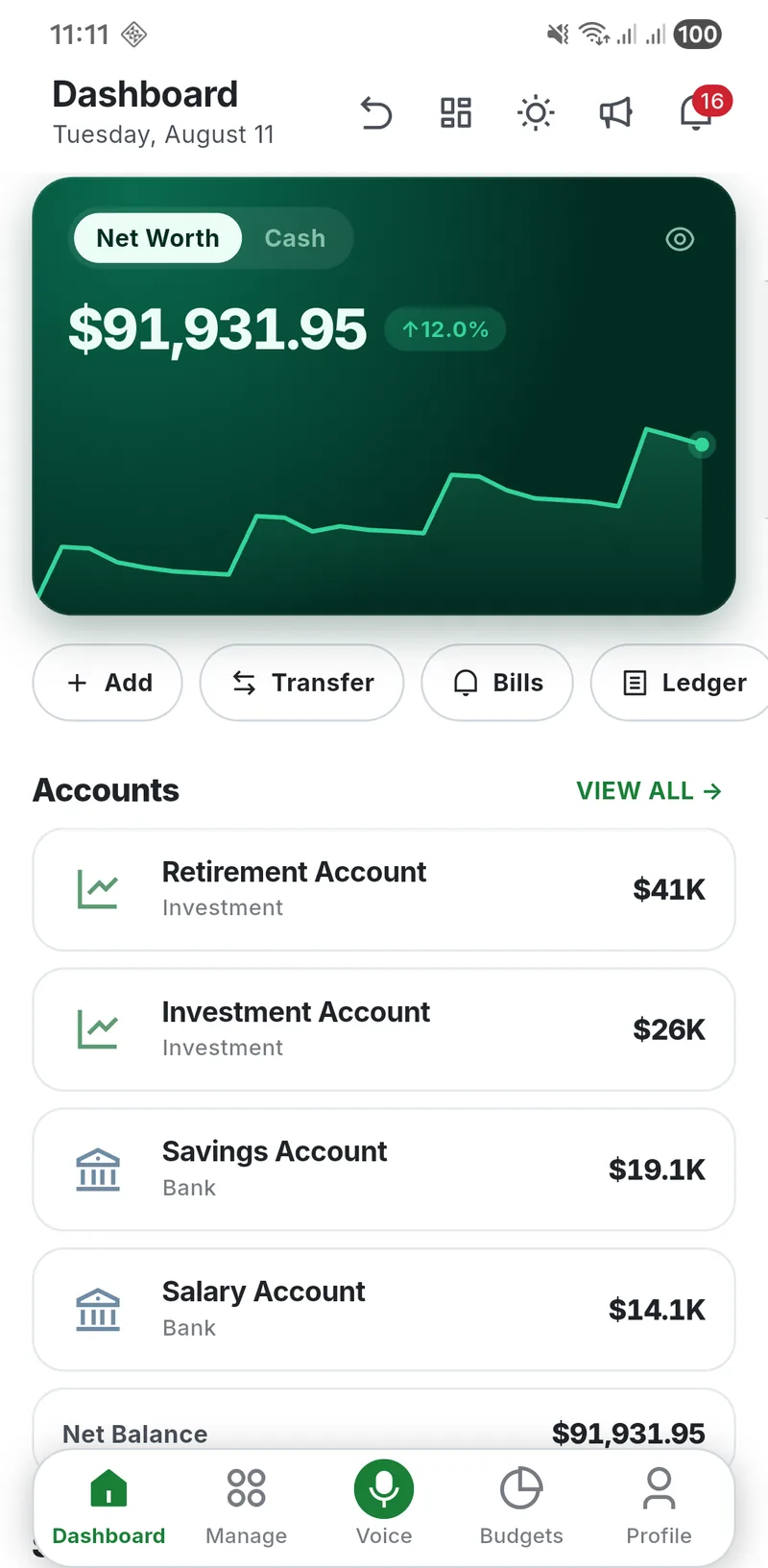
Every account in one place
Bank, cash, wallets, credit cards and investments roll up into a single net worth figure that updates the moment you log a transaction.
AES-256, on your device
Your vault is encrypted with AES-256-CBC plus HMAC-SHA256, unlocked by a key derived through 100,000 rounds of PBKDF2. Nothing is readable without your passcode.
Budgets that warn you early
Set limits per category and watch the bar fill. Daily, weekly, monthly or yearly — you get told before you overspend, not after the month closes.
Bills, EMIs and recurring
Rent, subscriptions, loan instalments. Schedule them once and Budget Lock reminds you, tracks what is paid, and counts down to the payoff date.
Goals with a real deadline
Point a goal at a holding account and every contribution is a genuine transfer, so the money you have saved is money you can actually see.
Lend and borrow tracking
Log what you lent and to whom, record part payments, and keep the running balance separate from your own spending.
50 languages, 50+ currencies
The full interface is translated into 50 languages, with right-to-left support, and handles more than fifty currencies including per-account conversion.
Yours to export, any time
One tap sends every transaction to CSV, or a formatted PDF report. No lock-in, no export paywall, no request queue.
Your Money Data Never Leaves the Device
Not a policy promise — an architecture. There is no Budget Lock account to sign into, and no server that could hold your ledger in the first place.
AES-256 encrypted
AES-256-CBC with HMAC-SHA256, keyed by 100,000 rounds of PBKDF2.
Works offline
Every calculation runs on the device. No server holds your ledger.
No account, ever
No email, no sign-up, no profile. Cloud backup stays optional.
50 languages
Full interface translation, right-to-left included.
50+ currencies
Per-account currency with conversion where you need it.
Free forever
Every feature unlocked. One payment removes ads if you want.

Tap Through the Real App
Eight screens from the shipping Android build. Pick one — everything you see runs on the device, with no server behind it.
Every balance on one screen
Net worth updates the second you log a transaction, with the trend line right underneath it. Switch between net worth and spendable cash in a tap.
- Bank, cash, wallet, card and investment accounts
- Live net worth with a rolling trend
- Add, transfer, bills and ledger one tap away
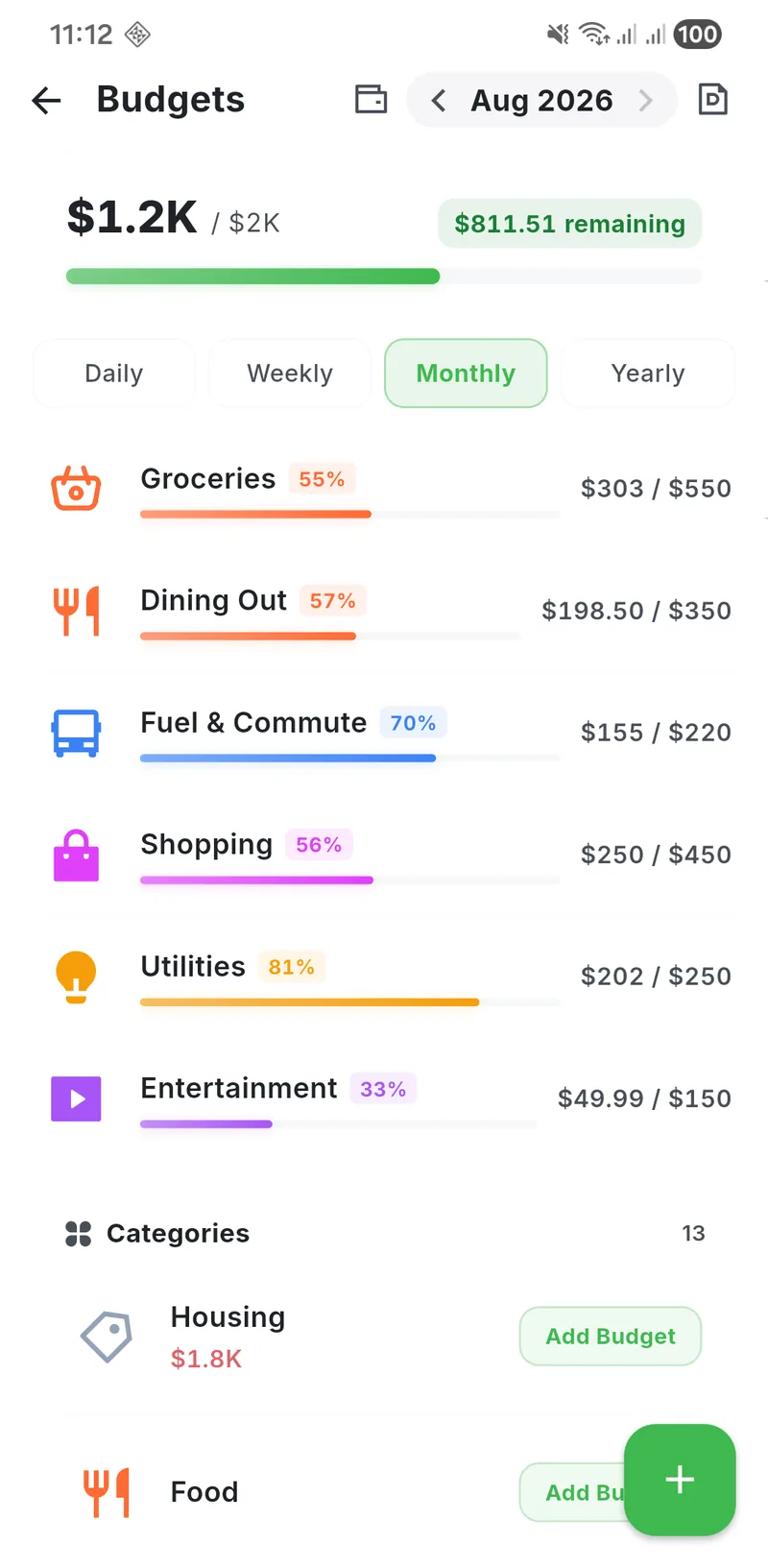
Warned before you overspend
Set a limit per category and watch the bar fill. Daily, weekly, monthly or yearly — the warning comes while you can still act on it.
- Per-category progress with a live percentage
- Daily, weekly, monthly and yearly periods
- Remaining balance always in view
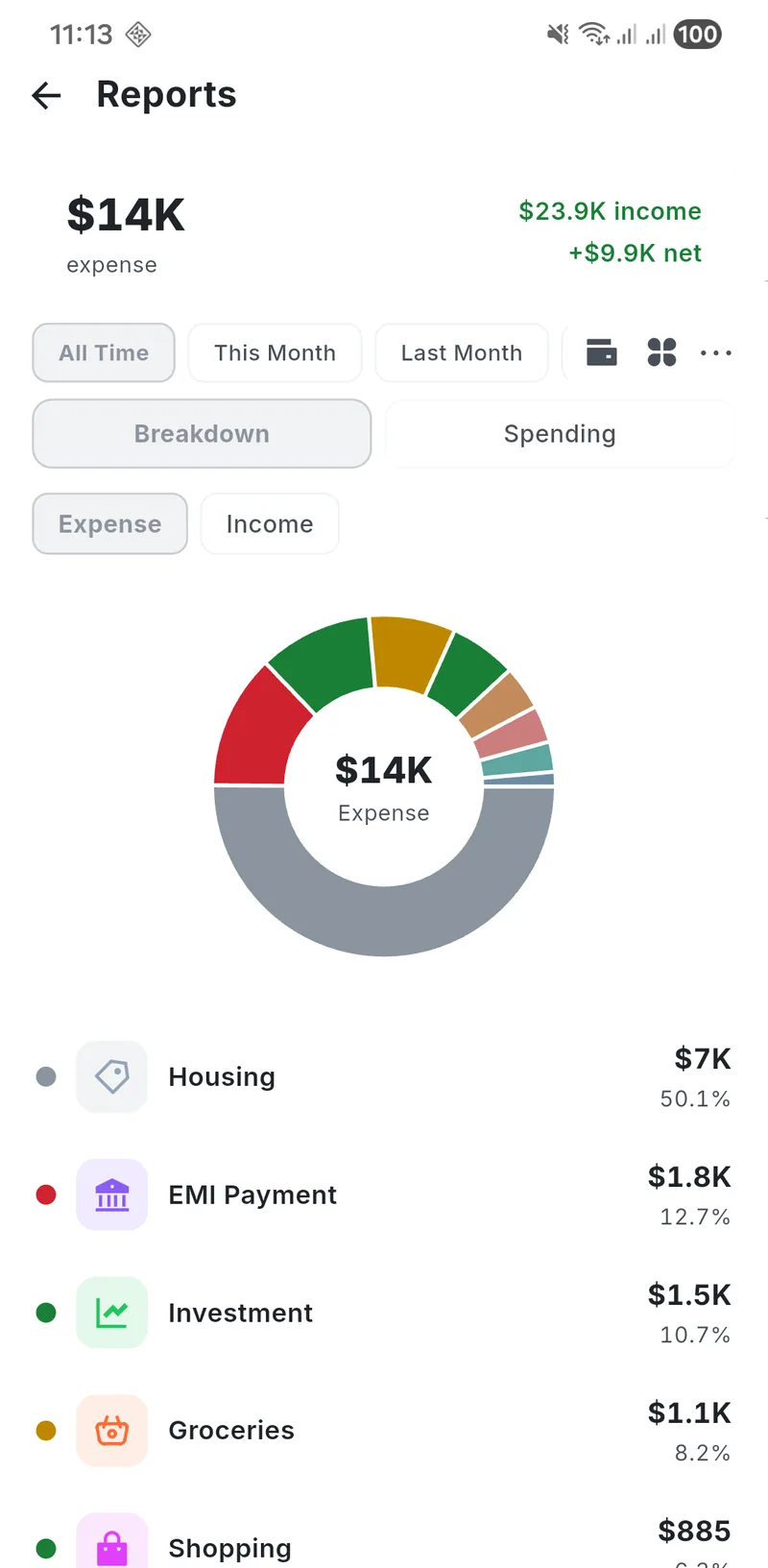
Where the money actually went
Break spending down by category, by month, by account. See the trend rather than one number, and take the whole thing with you when you need it.
- Category and account breakdowns
- Month-over-month comparison
- PDF and CSV export
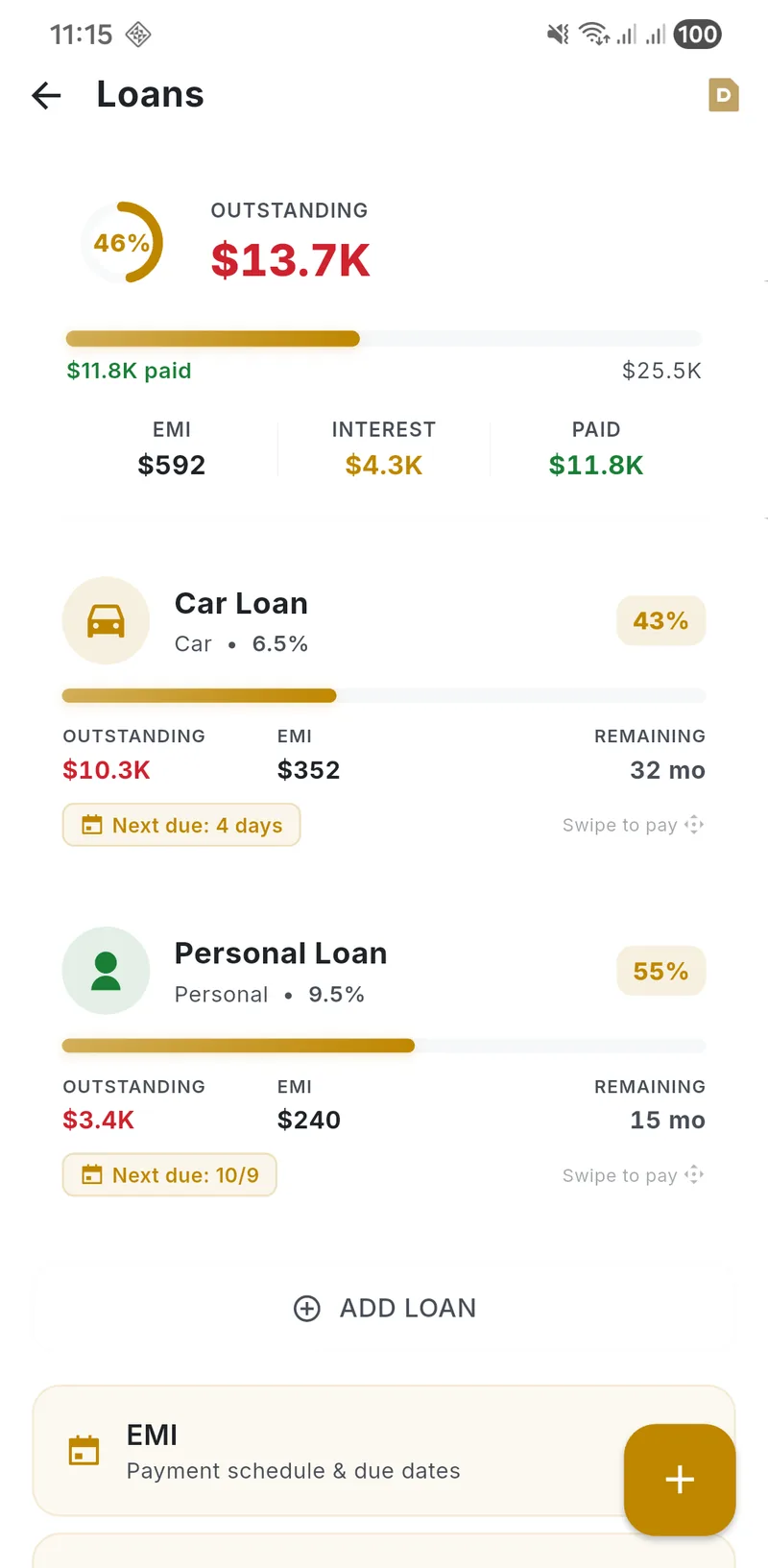
Interest, principal, payoff date
Track every loan and instalment. What is interest, what is principal, what is left, and the exact month it clears.
- EMI schedules at a glance
- Interest against principal, split out
- Outstanding, paid and payoff countdown
EMI figures are mathematical estimates only — not a loan approval, lender quote, or investment recommendation. Consult your bank or NBFC for actual terms.
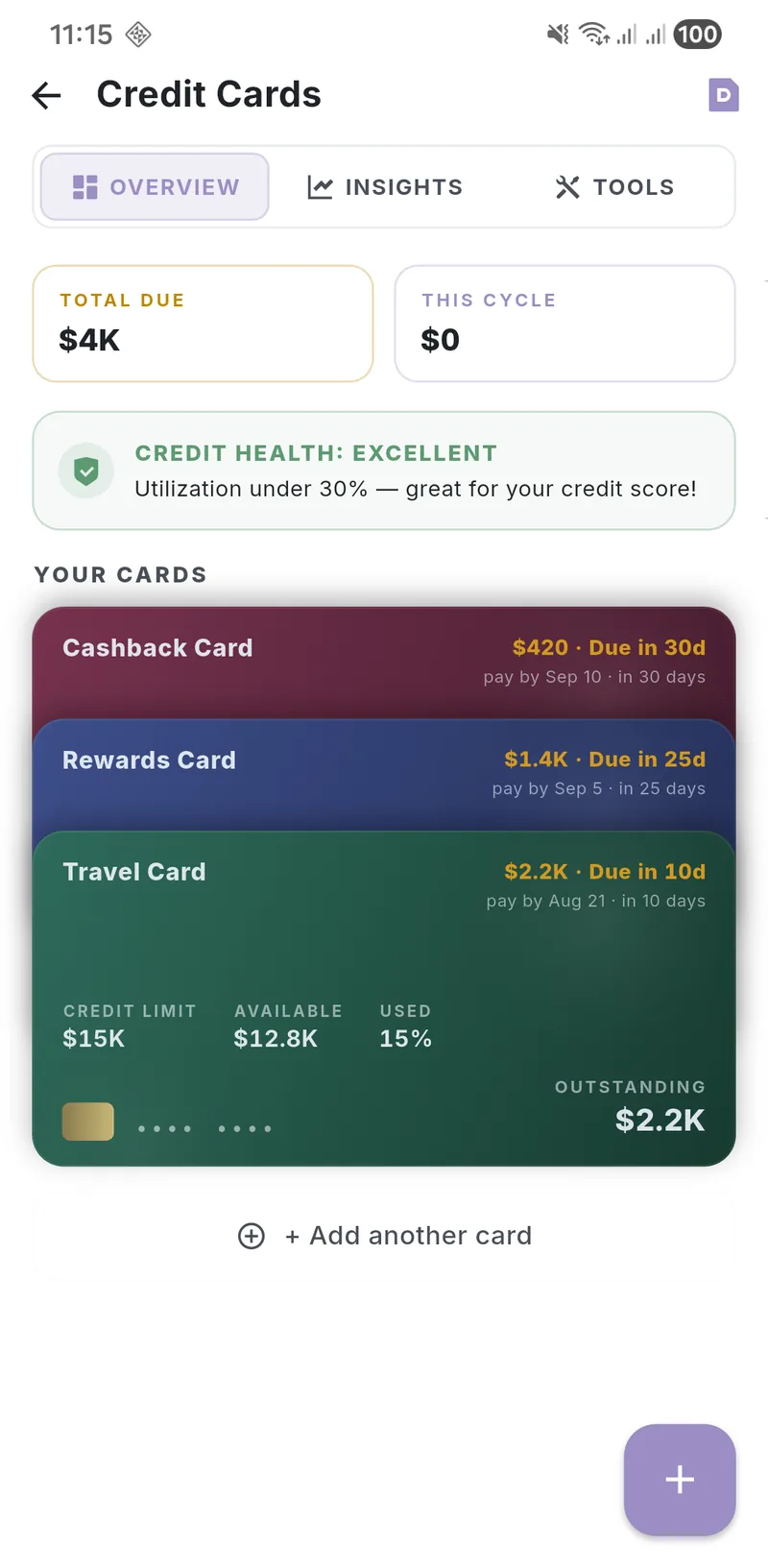
Billed and unbilled, kept apart
Billed, unbilled and available credit tracked separately, so the number you look at is the number you can actually spend.
- Billed vs unbilled balances
- Utilisation per card
- Statement dates and payment history
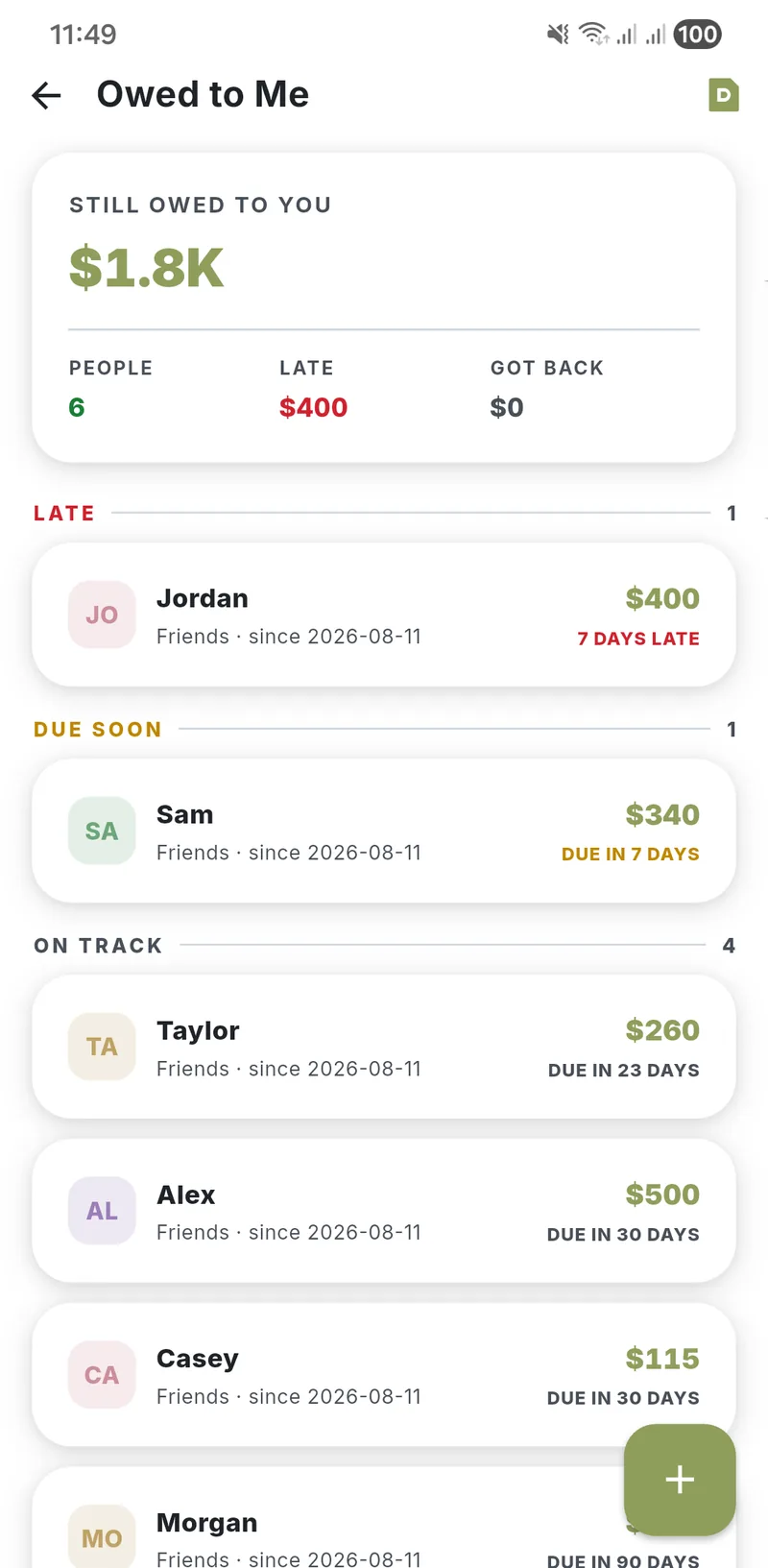
Money you lent, money you owe
Log what you lent and to whom, record part payments as they come in, and keep it out of your own spending totals.
- Running balance per person
- Partial repayments and settled history
- Lent and borrowed both tracked
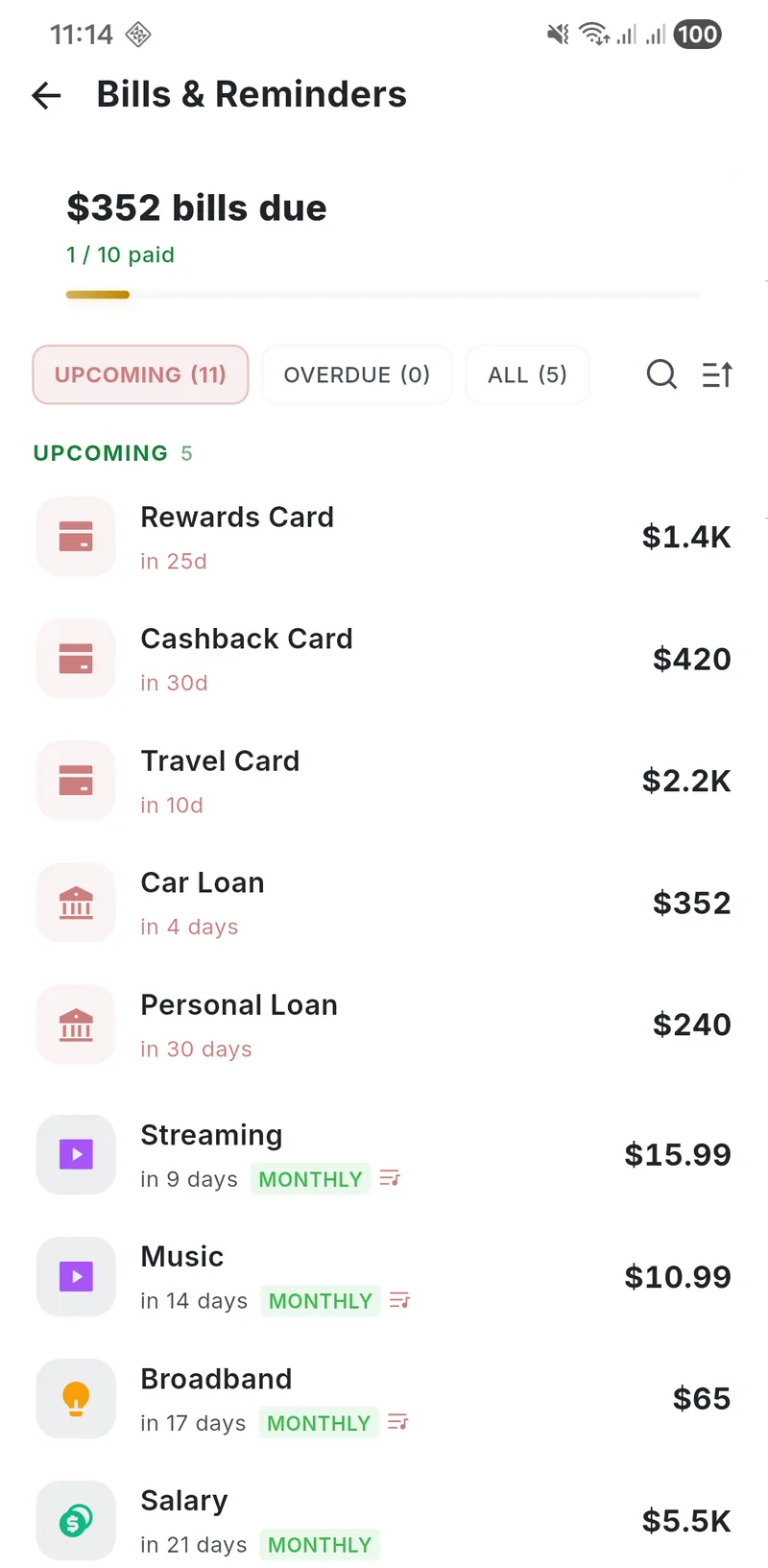
Nothing quietly slips past
Rent, subscriptions, utilities, instalments. Schedule once, get reminded on time, and see what is still outstanding this month.
- Recurring schedules and calendar view
- On-device reminders, no account needed
- Paid and pending at a glance
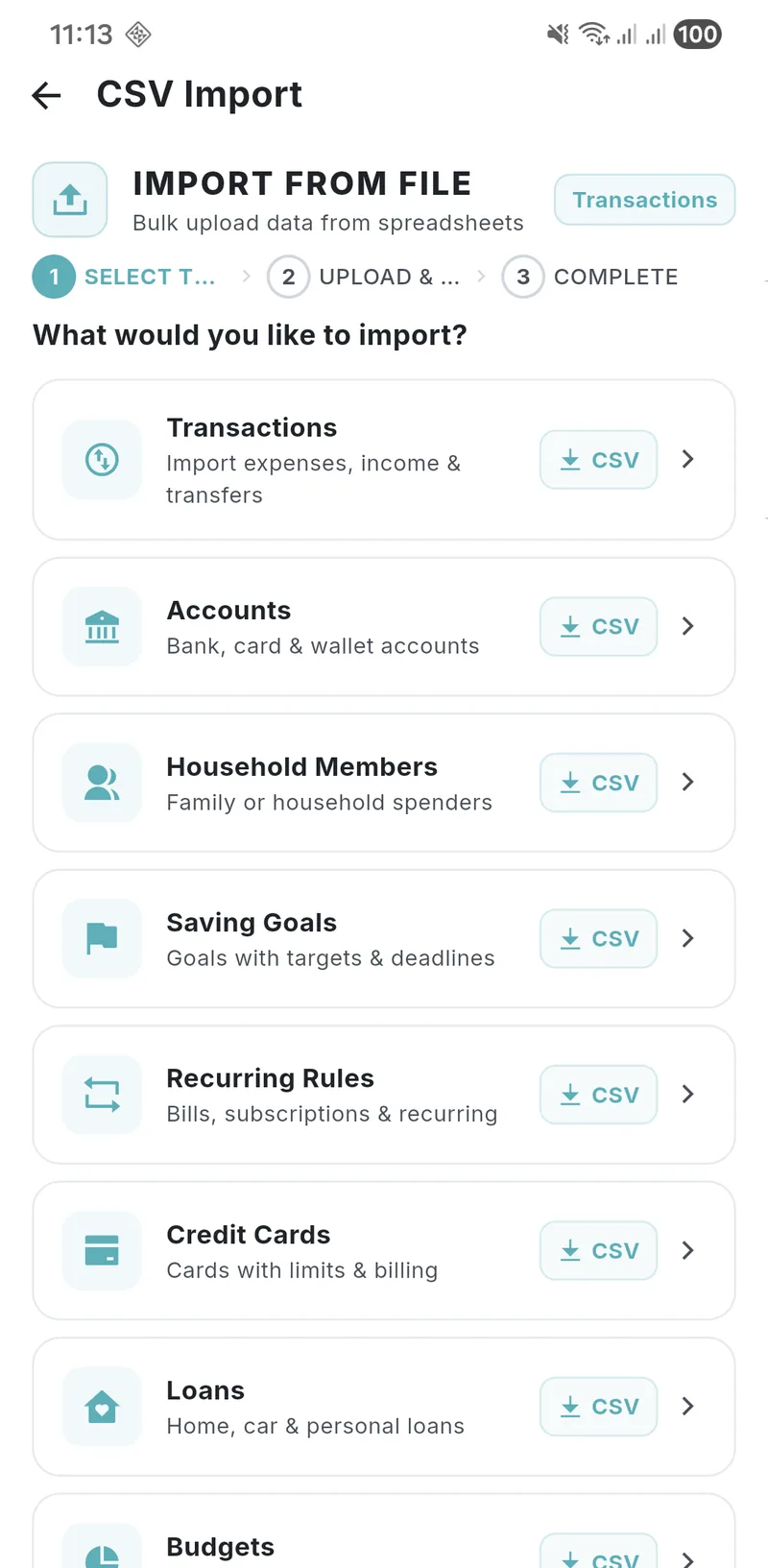
Yours to take out, any time
Bring history in from another app, and take everything out whenever you want. No lock-in, no export paywall, no request queue.
- CSV import with column mapping
- Full CSV export and formatted PDF reports
- Encrypted local backup
Split Your Pay the 50/30/20 Way
Put in what you take home each month. The split is worked out in this page, on your device — the same way the app works.
Worked out in your browser. Nothing is sent anywhere, and nothing is stored.
Rent, groceries, utilities, transport, minimum debt payments.
Eating out, subscriptions, shopping, trips, hobbies.
Emergency fund, goals, investments, extra debt payments.
What People Actually Say
Unedited reviews from Budget Lock users, in their own words.
I was surprised to find this great app among many others on the Play Store. I’ve used several, but I found this one to be very well thought out in its smallest details. Even in the free version, we have total freedom over the app — settings, accounts, cards, investments, loans, colours, dashboards.
Translated from Portuguese by Google Play
I recently started using the app. It’s really comprehensive and helps me keep track of all my expenses and plans.
Translated from Spanish by Google Play
I find this app very useful.
Translated from French by Google Play
Fire app ngl
Frequently Asked Questions
100% free with all features unlocked — budgets, transactions, goals, loans, the works. Ads keep it free. Want them gone? One payment, ads disappear forever. No subscriptions. No tricks.
AES-256 encryption locks everything on your device. No servers. No accounts. No sign-ups. Your data never leaves your phone unless you choose encrypted Google Drive backup — and even then, it’s encrypted before upload.
Yes. Your finances are tracked entirely on your phone — transactions, budgets, reports, everything — with no account and no sync. Six things do use the internet: ads on the free tier, optional cloud backup, a security check that reports an anonymous device fingerprint to spot tampered copies of the app, the exchange rate when you enter a second currency, and a one-time font download the first time you export a Chinese, Japanese or Korean PDF, and the offline assistant's file, downloaded from GitHub only if you choose to download it in the app. Cloud backup stays off until you turn it on, the “Remove Ads” purchase stops the ads, and the last three only happen if you use those features. None of them carries your financial data.
You can clear all your data from Settings > Data Management > Delete All Data inside the app. Since we don't store anything on remote servers, deleting data from your device removes it permanently. For GDPR/legal deletion requests, visit our Delete Your Data page.
Budget Lock supports 50 languages and automatically adapts to your device's language setting. You can also change the language manually in app settings.
Budget Lock is a free budget app for Android with all features unlocked — expense tracking, multi-account management, budget planning, savings goals, loan & EMI tracking, bill reminders, and PDF reports. Every feature works with no connection, your records stay on the phone under AES-256 encryption, and it supports 50 languages and 50+ currencies, and requires no subscription or sign-up.
Yes. Every feature runs with no connection: expense tracking, budget planning, savings goals and financial reports are all calculated on your device, and none of your financial data is sent anywhere. Cloud backup is off until you switch it on. Ads are the one part you don’t control on the free tier — they load over the network, and the one-time “Remove Ads” purchase stops them.
Yes. Budget Lock includes a full loan and EMI tracker. You can add personal loans, home loans, car loans, and credit card debt with interest rates and tenure. The app calculates amortization schedules, shows interest vs. principal breakdowns, and tracks your exact payoff date.
No. Budget Lock is completely free with no subscription required. All core features — budgets, expense tracking, savings goals, loan management, bill reminders, reports — are available at no cost. The app shows non-intrusive ads which can be removed permanently with a one-time purchase.
Budget Lock keeps your finances on your own phone and costs nothing — no subscription, no bank linking, no forced cloud account. Your data stays encrypted on your device with AES-256 encryption. It offers budget tracking, expense management, savings goals, loan & EMI tracking, and 50 language support without requiring an account or internet connection.
Budget Lock makes it easy to start budgeting even with zero experience. The app comes with ready-made spending categories, guided budget setup, and a simple 3-second transaction logger. Just download, set your monthly income, and start tracking — no learning curve needed.
The 50/30/20 rule splits your income into 50% needs, 30% wants, and 20% savings. Budget Lock lets you create custom budget categories that match this rule or any budgeting method you prefer — including zero-based budgeting and envelope budgeting.
Open Budget Lock, tap the + button, enter the amount, pick a category, and save. It takes 3 seconds. You can also use the home screen widget to log expenses without even opening the app. Every transaction is stored offline with AES-256 encryption.
Yes. Add each family member as a spender, give them a monthly spending limit, and tag transactions to whoever spent the money. Budgets are set by category and accounts can be split by person, so household spending is tracked in one vault on one device. Budget Lock is a single-device app: there is no multi-user login and no syncing between phones.
Budget Lock is built for privacy. It uses AES-256 encryption, keeps every financial record on the device, requires no account or sign-up, and keeps your financial records off remote servers. Your financial data never leaves your phone unless you opt into encrypted cloud backup.
Yes. You can add credit card accounts, track utilization, monitor spending limits, and set payment reminders. The app shows outstanding balances, payment due dates, and helps you avoid interest charges by keeping all your credit card data organized in one place.
Budgeting Guides & Money Tips
Proven strategies to manage your money, clear debt, and reach your goals faster.
The 50/30/20 Budget Rule
Split your income into needs, wants, and savings with this simple, proven budgeting framework.
Read guide →How to Create a Monthly Budget
Set up your first monthly budget in 30 minutes and take control of your finances today.
Read guide →Build an Emergency Fund
Start from zero and build a safety net that protects you from unexpected expenses.
Read guide →Zero-Based Budgeting
Give every dollar a job and eliminate wasted spending with this powerful budgeting method.
Read guide →Track Your Expenses
Learn the most effective ways to track daily spending and spot where your money actually goes.
Read guide →Stop Living Paycheck to Paycheck
Break the cycle with actionable steps that help you save, even on a tight income.
Read guide →Envelope Budgeting Method
Divide cash into category envelopes and never overspend a single dollar again.
Read guide →Pay Off Credit Card Debt Fast
Seven proven strategies to clear high-interest balances and stop the interest bleed.
Read guide →Snowball vs. Avalanche
Compare the two debt payoff methods side by side and pick the one that actually works for you.
Read guide →Save for a House Down Payment
Calculate how much you need, set a realistic timeline, and hit your homeownership goal.
Read guide →Understand Your Credit Score
What FICO actually measures and eight specific moves that lift your score within months.
Read guide →Budget as a Couple
Five methods for managing money together — and avoiding the fights that usually come with it.
Read guide →Download the Free Budget App for Android
No sign-up. No email. No subscription. Download Budget Lock and start tracking expenses in under 30 seconds — your financial data never leaves your phone unless you opt into encrypted cloud backup.